
Fix My Speaker
Fix problems with water and dust in your device’s speaker.
Tools






Did your phone fall into water, is the speaker hoarse, or is music no longer as clear as it once was? Many people prefer to replace their phone in these situations. However, the solution is easier than you think! Phone Sound Fix is a tool that helps you restore your speaker to its former state in seconds. And you don’t need to download any apps.
Table of Contents
WHAT IS PHONE SOUND FIX?
When your phone is dropped in water or gets dust inside, the sound often becomes hoarse or quiet. You can use the Phone Sound Fix website to fix this. Phone Sound Fix is a simple yet effective system designed to help resolve speaker sound issues that may arise over time. This system, with its very simple operating principle, emits special sound waves.
These special sound waves, emitted at different frequencies, remove dust and water droplets that have accumulated inside the speaker. In other words, it’s a tool that helps clean the speaker without requiring repair.
However, it’s worth noting that this tool isn’t just for emergencies; regular use is essential. Regular use can improve your phone’s speaker performance. Phone Sound Fix is a free and reliable speaker cleaning tool that works directly in your browser, without installing any additional apps on your phone.
HOW DOES FIX MY SPEAKER WORK?
Your phone’s speaker is a sensitive part that’s constantly in use. Therefore, getting dust, water, or dirt inside can cause issues like muffled sound. That’s why you need to use the Fix My Speaker tool. But how does it work? Our Fix My Speaker tool has two main operating methods: sound waves and vibration.
- Sound Waves Method: The sound wave method generates sound waves from the speaker at levels the human ear is not accustomed to. Typically, a speaker outputs a specific volume. However, with the fix my speaker tool, unusual sound waves and pressure are created. This pressure dislodges trapped water and dust particles. The primary objective is to dislodge dust and dirt from the speaker using sound waves at various frequencies.
- Vibration Method: Another method is vibration. Our tool generates vibrations using sound waves. This vibration dislodges water and dust particles stuck to the speaker. Water droplets, especially those that accumulate on the speaker, are broken up and expelled by this vibration. Water and dust particles trapped in the speaker prevent proper operation. However, the vibration method also allows the speaker to be reset.
With these two methods, your speaker will regain its previous sound quality. However, it’s best to use both methods several times for better results.
HOW TO USE FIX MY SPEAKER TOOL?
Using the Fix My Speaker tool, developed by Phone Sound Fix, is incredibly easy. You don’t need any technical knowledge, apps, or help. What you need to do step-by-step:
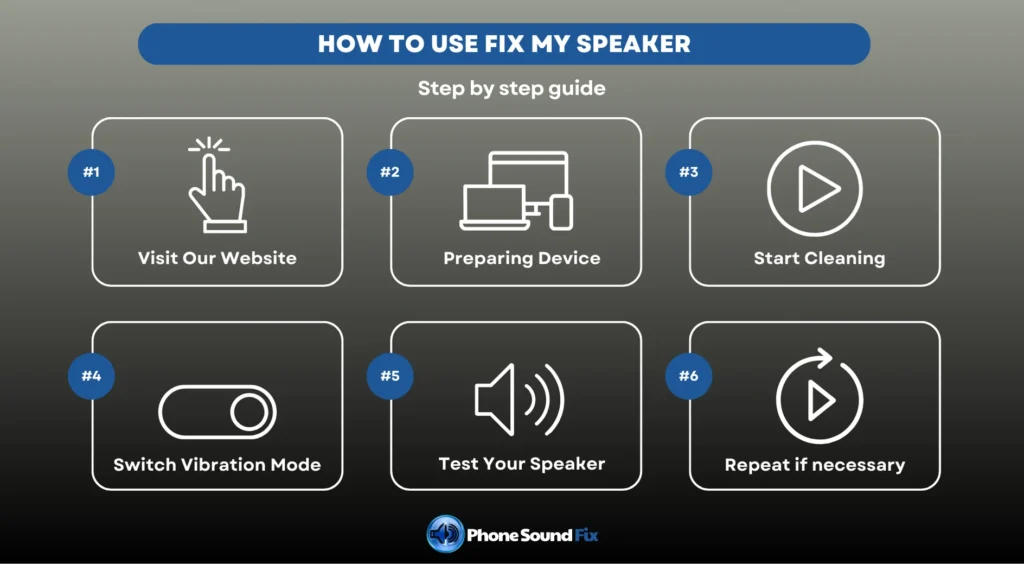
- Visit Our Website: First of all, you should search for and visit the Phone Sound Fix website on your browser. Our tool works directly in the browser, so you don’t need to install any additional applications.
- Preparing Device: Before starting, you should make the necessary preparations. So, what are these? Initially, you should clean your device’s speaker. Then, you should maximize the volume for optimal results. Before starting, you should place your device on a flat surface.
- Start Cleaning: There are two cleaning modes on the homepage: sound wave and vibration. Select the sound wave mode and click the start button. After clicking the button, the special sound waves will begin emitting from the speaker. Wait until you see the 100% completion sign on the progress bar.
- Switch Vibration Mode: After the sound wave mode is complete, switch it to vibration mode and restart it. Wait until the progress is 100% complete. The vibrations activate any water and dust particles trapped inside the speaker.
- Test Your Speaker: Once you have completed all the steps, you should test your speaker’s performance by playing a song or audio file on your phone. You’ll notice that the sound is much better than before.
- Repeat if necessary: If your speaker doesn’t work properly after this process, or if it doesn’t work as you would like, you should repeat the same process as above. This process is completely safe and won’t harm your device.
WHAT ARE THE FEATURES OF THE FIX MY SPEAKER TOOL?
Our Fix My Speaker tool offers a range of features beyond just cleaning your device’s speakers. In this section, we will discuss the features of our tool. These features include:
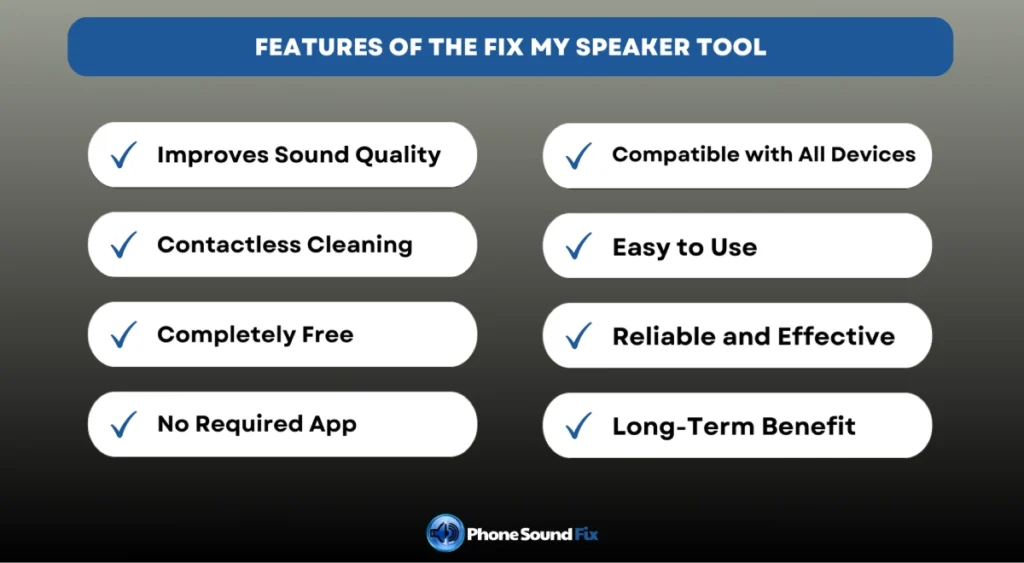
- Improves Sound Quality: The main purpose of our tool is to improve the sound quality of your device and eliminate sound distortion caused by water or dust.
- Contactless Cleaning: This tool allows you to clean your speaker without opening your device or requiring any manual intervention. This feature allows for repairs without any damage to the speaker itself.
- Completely Free: The Phone Sound Fix website is completely free. You can clean your speakers without downloading any apps, paying any fees, or hidden charges. Additionally, there is no limit to the number of transactions, so you can use it as much as you like.
- No Required App: There is no need to install any apps or files. You can use our tool directly by visiting our website. This saves you time and doesn’t take up unnecessary space on your phone.
- Compatible with All Devices: It can run smoothly on any device, including Android, IOS, and all computers.
- Easy to Use: There is no need for complicated menus, complex procedures, or technical adjustments. Simply visit our website and start using it with a single click. Our simple, user-oriented interface makes using our tools easy.
- Reliable and Effective: Sound waves and vibrations are used to clean the inside of the speaker. Therefore, our tool is completely safe and will not damage your device.
- Long-Term Benefit: Water, dust, and dirt particles left inside your speaker for extended periods can cause permanent damage and deterioration over time. Our tool removes these particles from the speaker, ensuring its cleanliness and durability.
BENEFITS OF FIX MY SPEAKER TOOL
We have listed the essential benefits of the Fix My Speaker tool for cleaning your speaker as follows:
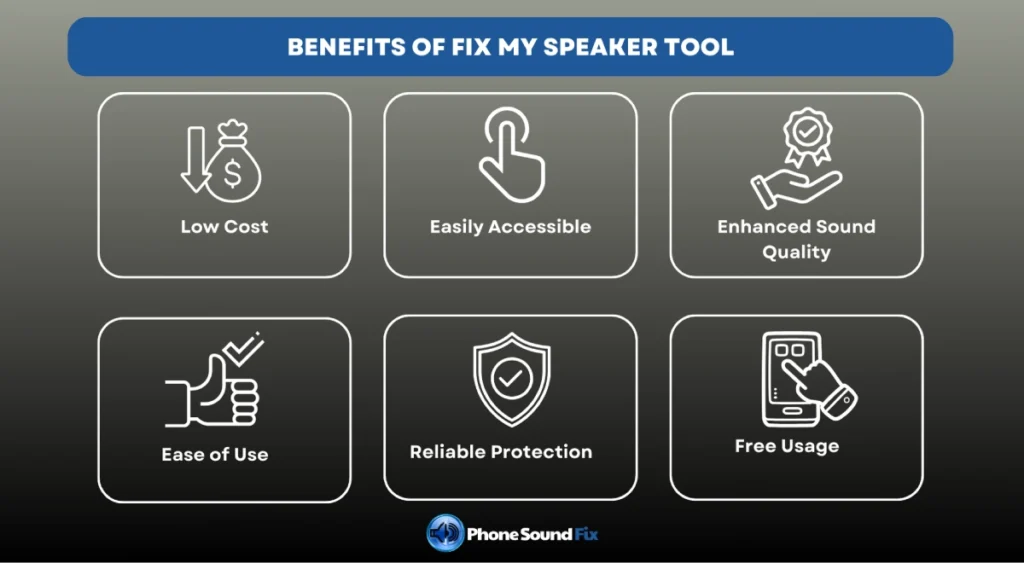
- Low Cost: When a phone falls into water or the speaker starts producing a hoarse sound, most people immediately consider taking it to a repair shop or replacing it. However, with the Fix My Speaker tool, these costs are eliminated. The tool can save you money by making it easy to clean your speaker.
- Easily Accessible: You can easily access and use it from anywhere, using only a device with an internet connection. It offers convenience by being available at any time.
- Enhanced Sound Quality: Regular use of the tool significantly improves the sound quality of your speaker. This helps prevent dust and other small impurities from accumulating over time, and also prevents issues like hoarse sound.
- Ease of Use: Fix My Speaker is one of the simplest ways to use it. To use this tool, simply visit the Phone Sound Fix website. After that, you should select one of the modes on the homepage and click the start button.
- Reliable Protection: Our Fix My Speaker tool works only with sound waves and vibration. This means it does not cause any damage to any hardware or software part of your device. Namely, you can use it with peace of mind without any hesitation.
- Free Usage: One of its most important benefits is that it’s free! You can access all the features the tool offers without paying any fee.
- Ability to Perform Regular Maintenance: You can perform continuous maintenance on your phone using the tool, which is available to you unlimitedly.
WHAT ARE THE DIFFERENCES BETWEEN PHONE SOUND FIX AND OTHERS?
There are different tools available for cleaning speakers and troubleshooting sound issues. Yes, but what sets us apart? Our Fix My Speaker tool stands out for its innovative, user-friendly, and easy-to-use features. We have evaluated ourselves and other tools through a table. Let’s take a look together:
| FEATURES | PHONE SOUND FIX | OTHER TOOLS |
| Principle | It is a web-based tool that typically uses special sound waves and vibration. | They are usually vibration-focused and app-based, so no download is required. |
| Usage | It’s easy to use, works with just one click, and doesn’t require any additional applications or procedures. | App-based ones require downloads. Additionally, some have mode selection or frequency adjustments. |
| Compatible | Accessible from all devices, including Android, iOS, and computers. Compatible with all devices. | They can usually be accessed from smartphones. |
| Water and Dust Cleaning | It repels water and dust, protecting the device. | Not every vehicle has dust cleaning capabilities or is limited. |
| Cost | All features of the Phone Sound Fix website are free. | Most have subscription fees. Many of the free ones have usage limits and frequent ads. |
| Security and Risk | It does not affect the device’s hardware or software. It is completely safe. | Some apps may contain viruses that harm the device. |
| User Friendly | It offers ease of use with its simple and user-friendly interface. | They often have complex interfaces, which can create confusion. |
WHAT IS THE PRINCIPLE OF THE FIX MY SPEAKER TOOL?
Because Fix My Speaker is an unconventional tool, its working principle is a matter of curiosity. This highly effective tool is also remarkably simple. I would like to give you a more detailed review:
- First, let’s discuss the basic operating principle and mechanism of a speaker. This system relies on sound waves and vibration. Our device generates sound waves and vibration at a specific frequency, causing the speaker diaphragm to move faster and more powerfully than normal. This movement creates pressure. This pressure dislodges and expels any water or dust trapped inside the speaker. Vibration is particularly important for dislodging and expelling water and dust accumulated inside the speaker.
- On the other hand, it is essential to understand the effects of sound waves. Vibration and sound waves have different effects on a device that serves the same purpose. For example, the shaking created by vibration loosens water droplets trapped inside the speaker and forces them out. The pressure created by sound waves prevents water from further penetrating the speaker and causing permanent damage.
The best part about this tool’s simple operating principle is that it delivers fast results and is completely natural. Any additional software or hardware intervention could put the device at risk and render it unusable.
THE PROBLEMS THAT CAN BE SOLVED BY THE FIX MY SPEAKER TOOL
- Water Damage: If your phone is dropped in water or has liquid spilled on it, water entering the speaker can cause poor sound quality or even no sound at all. Our Fix My Speaker tool generates sound waves and vibrations at a specific frequency, helping to remove water droplets trapped inside the speaker. This can restore sound quality.
- Dust and Dirt Blockages: Over time or through use, dust may accumulate inside a speaker. If a speaker isn’t cleaned for an extended period, this dust builds up a residue and prevents the speaker diaphragm from vibrating freely. This can lead to poor sound quality. Our Fix My Speaker tool generates powerful vibrations that dislodge the settled dust and push it out of the speaker.
- Hoarse or Distorted Sound: Moisture or dust buildup inside a speaker can cause the sound coming out of your speaker to become blurry or distorted. Using our effective tool, you can remove the residue in just a few seconds and achieve clearer, higher-quality sound.
- Low Volume: A muffled sound coming from your speaker can be quite annoying, especially in emergencies. If your device’s sound is quieter than before, there could be several possible causes. The most common ones are water ingress or dust accumulation. Using the Fix My Speaker tool, you can fix all of these issues and restore the volume to its previous level.
- Blockages In the Charging Port: Moisture and dust can affect not only the speaker but also the charging port. Water damage or dust accumulation in the charging port can prevent your phone from charging. This may lead to significant disruptions and costs in daily life. However, the sound waves and vibration generated by our device also affect the charging port, thus eliminating the problem.
WHAT TO DO IF YOU DROP YOUR PHONE IN WATER?
It is normal to panic when your phone falls into water, but if you know the proper steps, there’s no need to panic. These steps are:
- First and foremost, remove your phone from the water and turn it off immediately. If the device remains on, there is a risk of short-circuiting.
- Then, remove the SIM card and memory card from the phone and leave it open. This way, any water that gets inside won’t get trapped, and it can breathe.
- After removing all accessories from your device, wipe it thoroughly with a soft, dry, moisture-absorbent cloth without shaking it. During the wiping process, be careful not to leave any moisture in sensitive areas, such as the charging port, speaker, and connection buttons. However, we must emphasize that you should never shake your phone! Doing so will push water deeper into the device and damage sensitive components.
- Then, dry the device by vacuuming the water out of the phone with the small vacuum cleaner nozzle. Be careful not to get the nozzle too close to the device during this step.
- At this point, you can start drying the device. As a first method, you can try a jar of uncooked, completely dry rice. Place your phone in the rice and wait for it to absorb the moisture. Alternatively, place the phone in an airtight container using silica gel packets.
- For both methods, you should wait approximately 24-48 hours.
- Once the waiting period is over, turn on your device and perform a performance check. You should also perform a sound check at this point. If you’re still experiencing issues, you can use our Fix My Speaker tool on our Phone Sound Fix website to fix it.
- If you are still having issues after following the steps above, it is likely that the device is still damp or has sustained severe damage. At this point, you should take it to a qualified technician.
WHY IS IT IMPORTANT TO USE THE FIX MY SPEAKER TOOL?
Throughout this article, we have explained what the Fix My Speaker tool does and how it works. However, if you are still wondering why, it is important or why you should use it, we can explain it this way:
- It helps to produce clearer and higher-quality sound by cleaning the speaker.
- It works easily with a single click without requiring any technical knowledge.
- Going to a service center can be both challenging and expensive. However, our tool is completely free and fast.
- The speaker area is the first to be affected by dust and water. Sound waves and vibration can remove these particles, preventing further damage.
- It extends the life of the speaker and saves the cost of parts.
MYTHS AND FACTS ABOUT FIX MY SPEAKER
There is a lot of misleading information floating around the internet about Fix My Speaker tools. It’s time to separate the facts from the myths!
Misconceptions
- The Tool Dries the Phone Completely: There is some misleading information that the tool will remove water from the entire phone.
- Starting It Once Is Enough: It is thought that starting the tool just once will expel all the water and dust.
- Useless Without an App: Most people think that web-based tools are useless and that only tools with applications should be used.
- For Water Damage Only: Some people think that this tool should only be used on speakers that have been damaged by water.
- Each Device is Cleaned Simultaneously: It is thought that parts such as microphones and headphones can be cleaned at the same time with this tool.
The Right Ones
- Our tool doesn’t dry your phone completely. It simply pushes water droplets from the speaker area out using sound waves and vibration.
- Running it once may not be enough. For dust and water that have settled for a long time, you will need to run it more than once to get better results.
- The tool can also work on a website, with no app required. In fact, a website is even more advantageous because it requires no installation and is compatible with all devices.
- The Fix My Speaker tool can be used to clear blockages caused not only by water but also by small particulate matter such as dust, fabric debris or lint.
- Each piece has a different acoustic structure. Therefore, it’s not possible to capture all the sound waves and vibrations simultaneously. This may not be suitable.
FAQ
Yes, Fix My Speaker is a completely safe tool. It cleans using only sound waves and vibration. This means no manual intervention is required, making it safer and less risky. However, it is best not to play it for too long to avoid putting too much pressure on the speaker.
Fix My Speaker isn’t a tool that can completely repair your phone. It only focuses on the speaker’s problem. Therefore, if your phone has more physical damage, it’s best to contact a technician.
First, visit the Phone Sound Fix website in your browser. You will see the tool on the homepage. You can use it by first activating it in sound mode and then in vibration mode.
It is not recommended to use this tool for extended periods due to the pressure buildup on the speaker. Therefore, it would be better to do it several times at intervals.
If the sound is constantly muffled, low or scratchy, if there is no sound at all, or if you hear crackling sounds when you turn on something loud, this is an indication that there is a problem with your speaker.
Yes, using Fix My Speaker is a logical choice when your phone’s speaker is exposed to water.